



How to play the Chicken Road demo
Open the Chicken Road 2.0 demo
Open the game on this page and look for the virtual USD balance. If you’ve searched for “Chicken Road 2 demo play”, the game you want is InOut Games’ Chicken Road 2.0 with the Demo or Fun balance. The provider uses the name Demo Play for its public launch button.
To play Chicken Road demo rounds, give the field time to load before you choose a stake. Look for the road, the difficulty selector and Play. The USD display gives amounts a familiar format. The balance belongs to the demo session and access does not involve a payment screen.
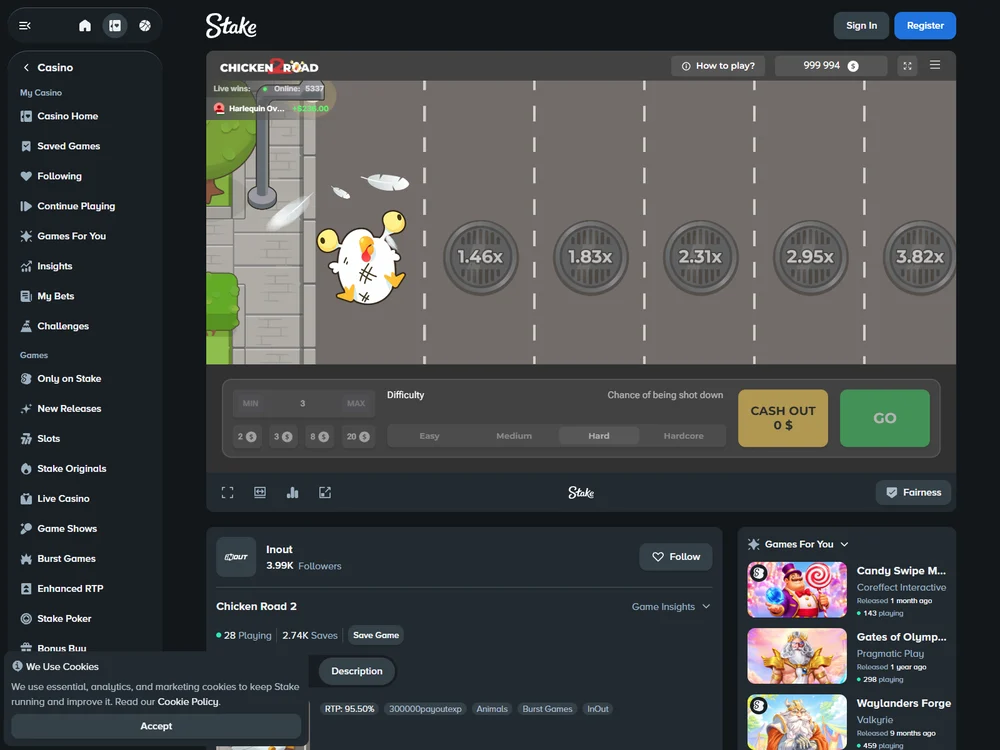
You can try Chicken Road for free on the provider’s public route. When two similarly named windows open, check the title and the field. The sequel has 30 lanes on Easy and the original has 24, so the lane count is a practical way to tell them apart.
Choose a stake and difficulty
- Check the balance. Confirm that you are in Demo or Fun play and that the balance is virtual. You can open Game rules from the client to check the limits for this launch.
- Enter your virtual stake. Type the amount or use MIN, MAX or one of the 2, 3, 8 and 20 USD presets. The rules show a minimum of 0.12 and a maximum of 200 virtual USD. The amounts are displayed to 0.01 USD.
- Select a road. Choose Easy, Medium, Hard or Hardcore before pressing Play. Once a stake is accepted, that amount and difficulty apply for the current round.
- Press Play once. The accepted stake is debited from the virtual balance. If play is interrupted after acceptance, check the round’s status before submitting another stake.
Play Chicken Road demo rounds with Go and Cash out
After a safe step, press Go to attempt the next lane with the original stake still in play. Press Cash out to request settlement at the amount displayed for your current position. You don’t pay for each crossing. The chicken’s position shows how far the current round has progressed.
If a car hits the chicken before the exit is accepted, the round ends at the collision and pays zero. The road has a finite number of lanes, so reaching its end also closes the cycle. The rules specify that a malfunction voids play and payouts. If play stops unexpectedly, use the round record and balance to see which outcome was recorded.
The menu keeps Sound and Music separate. On a keyboard, the Space toggle enables the move-forward shortcut. There’s also a full-screen view. For the first few rounds, the on-screen buttons make it easy to see where Play, Go and Cash out appear. The game rules and controls cover the full round sequence.
What the Chicken Road 2 demo shows
Four settings and one active RTP profile
Easy has 30 lanes, Medium has 25, Hard has 22 and Hardcore has 18. The lane count sets the length of the road. On the harder roads, the potential multiplier climbs faster and the risk of losing the stake on a crossing rises.
If you want to demo Chicken Road 2 on more than one road, finish the current round before changing the setting. Each road starts from the beginning when you place a new stake. On the screen, the position and next offer belong to the active road. Switching difficulties between rounds gives you a different sequence to look at.
The provider’s USD launch runs on a 95.5% theoretical return-to-player profile. The 97% and 98% versions are separate configurations chosen at launch. Each of the four difficulty settings in this demo uses the 95.5% profile. The difficulty selector changes the pattern of risk and possible payouts within it.
The difference between 100% and 95.5% is 4.5 percentage points before considering the effect of the payout cap in a modelled example. The RTP describes long-run play under the configuration. A single round can return zero, close at an offered multiplier or end under the void rule. The demo shows that variation without drawing from a cash balance.
The number beside Cash out represents the round’s gross return at the current lane. The client applies the shown multiplier to the original stake once. Each higher offer replaces the one from the previous lane, so the amounts you see along the road don’t add up to the round’s result. If you keep going, the earlier offer can no longer be selected on a later lane.
A search for “Chicken Road slot demo” can lead to the same title, but the game uses a single-player step-crash field. The chicken marks your position and the car marks a collision. The four roads change the rules for each step. There are no reel lines to select or held symbols to carry into another spin.
The first safe crossing offers 1.01× on Easy, 1.08× on Medium, 1.18× on Hard and 1.44× on Hardcore. Compare the same crossing on all four roads to see how the settings change the offer. The multiplier only applies after you reach the lane safely.
In the demo menu, How to play? covers the flow and Game rules lists the stake and payout limits. The 1.0.0 shown in the rules panel identifies the panel version for Chicken Road 2.0. If a listing elsewhere shows a different figure, check the rules in the window you’re playing.
Hard cash-out offers on a 3 USD virtual stake
I played Hard with a 3 USD virtual stake in a session that opened with 1,000,000 virtual USD. Separate observations showed a 1.18× multiplier and a 3.54 USD offer for lane one and a 4.38 USD offer for lane two. You can reproduce the arithmetic by multiplying the stake by the displayed multiplier for each position you reach.
| Safe lane | Multiplier | On-screen offer in virtual USD |
|---|---|---|
| 1 | 1.18× | 3.54 |
| 2 | 1.46× | 4.38 |
| 3 | 1.83× | 5.49 |
| 4 | 2.31× | 6.93 |
| 5 | 2.95× | 8.85 |
| 6 | 3.82× | 11.46 |
| 7 | 5.02× | 15.06 |
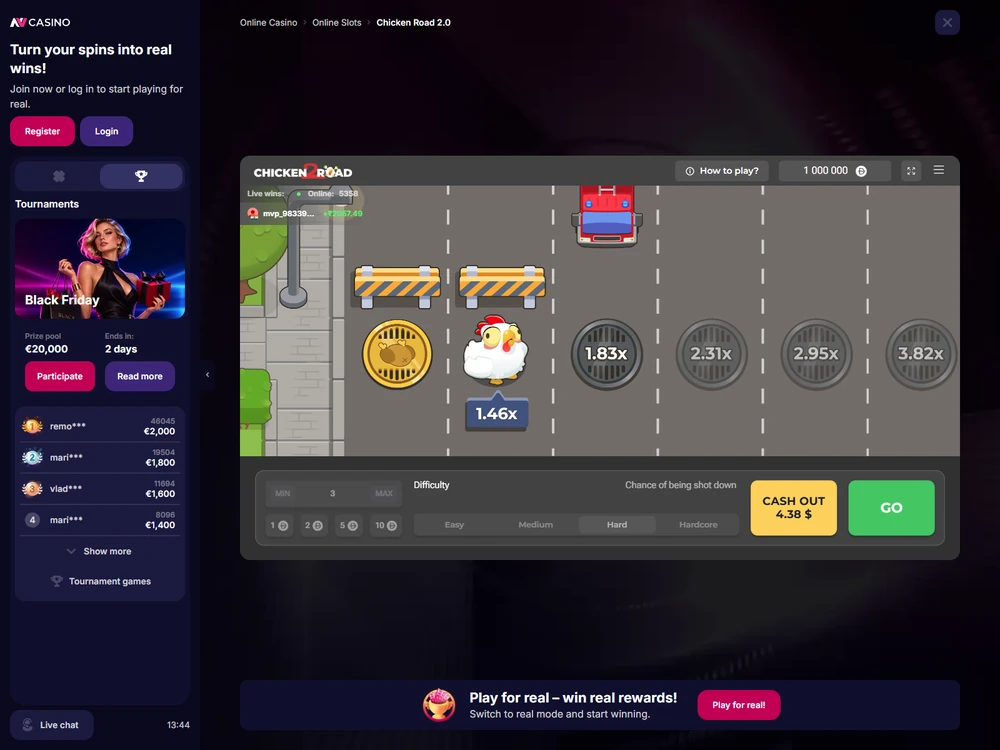
At 1.46×, a settled return of 4.38 USD on a 3 USD stake would leave a net increase of 1.38 virtual USD. At 2.31×, the return would be 6.93 USD and the net increase 3.93 virtual USD. Those calculations show what successful settlement at those offers would mean for the wallet. Clicking Go instead keeps the same original stake exposed to the next crossing.
Later Hard positions can carry much larger offers. Separate observations at a 3 USD stake showed 19.98 at 6.66× for lane 8, 77.40 at 25.80× for lane 12, 116.13 at 38.71× for lane 13 and 180.63 at 60.21× for lane 14, all in virtual USD. Each amount is an offer for its lane. An offer on the button gives no guarantee of reaching the same position in a new round.
Max win in the demo’s rules is 20,000 virtual USD per round. The settlement calculation takes the stake multiplied by the accepted multiplier, applies the cap and rounds to the nearest 0.01 USD. If the unrounded product exceeds 20,000 USD, the cap sets the gross amount for that round. The limit describes a virtual game credit in this launch. The net change in the balance still accounts for the stake already debited.
The balance can move even before the road displays a cash-out offer because the stake is debited when the round is accepted. I saw balances including 999,994, 999,991 and 999,988 virtual USD during the demo. A balance seen mid-round gives you the current amount available in the wallet. Use the completed history record to see how the round itself ended.
Where to check a completed round
Open My bet history when you want to check a result after the road closes. Bet shows the stake, Mult. records the multiplier and Win shows the outcome beside the date. Open the details for the Bet ID if you need to identify a particular round. You can also load older entries from the history panel.
If the round is still active, the credit on screen is an offer. After the round closes, the record distinguishes a settled Cash out, a collision with zero return and a void under the malfunction rule. A successful Cash out settles at the accepted position and credits the same virtual balance.
Play, the road position and My bet history each answer a different question. Play tells you whether the new round has begun, the road tracks the progress of that round, and the history shows its result once it closes. When comparing two entries with the same stake, use their Bet IDs to keep the rounds separate.
A completed round clears the current road position. The next Play opens a separate round at the start of the selected road. The demo also has no bonus buy or assigned bonus in this launch. An operator’s free-spin offer has separate eligibility and belongs to the game and wallet named in that offer.
Where to play Chicken Road 2.0
Compare six operator profiles. The scores reflect the routes tested for Chicken Road 2.0. Check authorisation in Poland and your account’s eligibility before depositing.
NV Casino

Cash test in PLN
- All 6 accepted rounds settled.
- Tested Visa deposit limits were 45.50–800 PLN.
- Withdrawals to a personal Visa started at 50 PLN.
Stake

Poland restriction
- Terms §14.3 exclude Poland.
- No cash bets were accepted in the Polish account.
- The 63 PLN transfer was still under review at the end of the test.
Total Casino

Signed-in PLN test
- All 5 accepted rounds settled.
- Public search found no exact InOut title.
- Tested BLIK deposit limits were 10–600 PLN.
Ice Casino

Cash test in PLN
- 5 of 6 accepted rounds settled. One was voided.
- Tested Skrill deposit limits were 40.50–700 PLN.
- The demo opened from the operator’s own game listing.
Bison Casino

Poland restriction
- The eligibility prompt required access from outside Poland.
- The virtual demo ran separately from the cash account.
- The 79.15 PLN BLIK payment was still under review at the end of the test.
Mostbet

Cash test in EUR
- All 7 accepted rounds settled in the EUR wallet.
- Standard Chicken Road 2.0 was listed as card 123628.
- Tested Mastercard deposit limits were 18.25–390 EUR.
How to open the Chicken Road game demo on mobile
How to demo Chicken Road on a phone
The Chicken Road game demo uses HTML5. Open this page in Chrome on Android or Safari on iPhone, load the game and use the on-screen controls. You can also demo Chicken Road in Firefox on either platform using the confirmed browser routes below.
| Platform and device | Browser versions |
|---|---|
| Android 16 / One UI 8, Samsung Galaxy S25 Ultra | Google Chrome 146.1.16 and Mozilla Firefox 146.1.32 |
| iOS 26, iPhone 17 Pro | Safari 26.1.28 and Mozilla Firefox 146.1.9 |
The versions identify the browser setups used for the official demo. In the mobile game window, check that the road, balance and buttons are visible before tapping Play. See the mobile guide for the wider set of game and operator routes.
If the embedded demo does not load
Open the InOut Games product card and select Demo Play in your browser. Once you see the virtual USD balance and the English controls, you can continue in the game window.
If you reopen the same session after an interrupted round, check its history first. A fresh demo launch starts with its own balance, so the new wallet won’t tell you how the previous round ended. For reloading and display problems, see the troubleshooting guide.
What changes between demo and real-money play in Poland
Virtual USD and operator wallets
The Chicken Road demo shows USD in its English-language interface. If you’re in Poland and usually see PLN in a cashier, there’s nothing to exchange for this demo. The virtual USD balance is supplied within the game session. Your payment method, local bank account and any balance held with an operator are outside that session.
If you want to try Chicken Road 2 for free, stay on Demo Play and check the balance in the game window. In a cash launch, a confirmed round outcome goes to the operator’s gaming wallet. A later request to move real funds from that wallet to a payment method is a separate cashier operation with the operator’s own rules.
InOut Games supplies the game and the official virtual mode. An operator controls account eligibility, wallet currency, identity checks and the configuration loaded for its customers. A matching logo or set of buttons can appear in both places. The balance type and the rules panel identify which mode and limits apply in the window you’ve opened.
Where access is decided
For cash play, check the terms for the specific operator and your country before relying on a game listing. For example, the terms for Stake exclude Poland, and Bison’s Poland access route stops at its eligibility screen. A provider demo may still be a way to familiarise yourself with the game controls without opening a cash account.
A separate Bison demo used units labelled DEMO, and a Stake demo in the Finnish profile used USD. A matching display currency is a way to read the amounts. Eligibility for a Polish cash account depends on the operator’s terms for Poland.
The public demo can take you from opening the game to checking a round in History with no account or deposit. Use it to practise the manual controls across four roads in a desktop or mobile browser. Any balance you build stays virtual. Use the provider guide for the studio’s role. If your question is about moving to cash play, check the real-money access guide for the conditions that apply in Poland.
FAQ
Can I play Chicken Road 2 for free in Poland without an account?
Yes. The public InOut demo launches in a browser without an operator account or a deposit.
Can I withdraw the demo balance?
No. Cash out settles the round inside the virtual session. The balance cannot be sent to a payment method or moved to an operator’s cash wallet.
Does difficulty change the demo’s RTP?
The demo uses a 95.5% theoretical RTP profile across its four difficulty settings. Changing difficulty alters the number of lanes, the risk on the road and the multiplier sequence. The 97% and 98% versions are separate launch profiles.
Why can the balance change when I reopen the demo?
A fresh launch has its own virtual balance. If you return to the same session and want to check an accepted round, open My bet history and look for the round’s record.
What if the frame does not load?
Open the InOut Games product card and select Demo Play. You can use Chrome on Android or Safari on iPhone to open the official browser route.
Has the round settled when a cash-out amount appears?
The displayed amount is an offer. After Cash out is accepted, the round settles at its accepted position and the result appears in the history.

Author
Publisher information
Chicken Road is an informational website published by Michał Kowalski. Casino operators manage player accounts, accept wagers and process deposits and withdrawals.
Play responsibly
18+. Gambling can cause financial and personal harm. Set limits on time and spending before you play. For support, see GamCare and GambleAware.